Configure session pinning
Session pinning uses configurable rules to assess whether a request is consistent with the session's original browser or may indicate session hijacking from another browser or device. It compares request signals with values stored in the session. These signals do not uniquely identify a physical device.
How session pinning works
The Enable Session id - User's IP pinning setting is now named Enable Session pinning. Its REST API field remains enableSessionIdUserIPPinning. The sessionPinningCriteria field defines the matching policy and takes effect only when session pinning is enabled.
Identify supports these signals:
| Signal | Request value | Supported match modes |
|---|---|---|
ipAddress |
Client IP address | exact, ipv4Prefix24, ipv4Prefix16, ipv6Prefix48, ipv6Prefix64 |
userAgent |
User-Agent header | exact, normalized |
acceptLanguage |
Accept-Language header | exact, normalized |
clientHintPlatform |
Sec-CH-UA-Platform header | exact |
clientHintMobile |
Sec-CH-UA-Mobile header | exact |
The normalized mode tolerates browser minor or patch version changes and harmless Accept-Language formatting changes. IP prefix modes allow changes within the selected address range.
Each matching signal adds its positive integer weight to the score. Mismatched or unavailable signals add zero. A request meets the policy when its score reaches minimumScore, which defaults to the total configured weight.
iOS browser compatibility
In tests on iOS 27, neither Safari nor Chrome sent the Sec-CH-UA-Platform or Sec-CH-UA-Mobile header. Identify recorded both signals as unavailable:
clientHintPlatform unavailable
clientHintMobile unavailable
The criteria remain valid, but these signals are unreliable for iOS browsers. Do not rely only on clientHintPlatform and clientHintMobile for iOS users. Use userAgent and acceptLanguage as the main criteria.
The following log shows both signals as unavailable and an IP address mismatch:
{
    "LogLevel": "ERROR",
    "EventId": "108",
    "MachineName": "identifyvm02",
    "RequestId": "f38ac419-572f-4c0f-bb34-c27f5bbecd34",
    "Timestamp": "2026-09-15T02:11:19.8277228Z",
    "UserId": "(unknown)",
    "Type": "SYS",
    "BuildNumber": "5.20.0.28",
    "LogMessage": "Session pin mismatch (0/100 score, minimum 60): clientHintPlatform unavailable (pinned: (none), now: (none)); clientHintMobile unavailable (pinned: (none), now: (none)); ipAddress 115.78.10.119 -> 103.199.69.148",
    "System": "RUNTIME",
    "LogId": "74c24121-0263-4ed2-9f5e-b6ce837dbbf1",
    "IPAddress": "103.199.69.148"
}
Configure the criteria
Tip
Start each new policy in logOnly mode to evaluate it without blocking users. Review event 109 during normal browser and network changes, and adjust the criteria or minimum score as needed. Switch to block only after confirming that legitimate requests meet the policy.
- Open System Setup > Security.
- Turn on Enable Session pinning.
- Enter a JSON document in Session pinning criteria.
- Set
"onMismatch": "logOnly"and save the settings. - Review mismatch logs during normal browser and network changes. Adjust the policy, then change
onMismatchtoblockto enforce it.
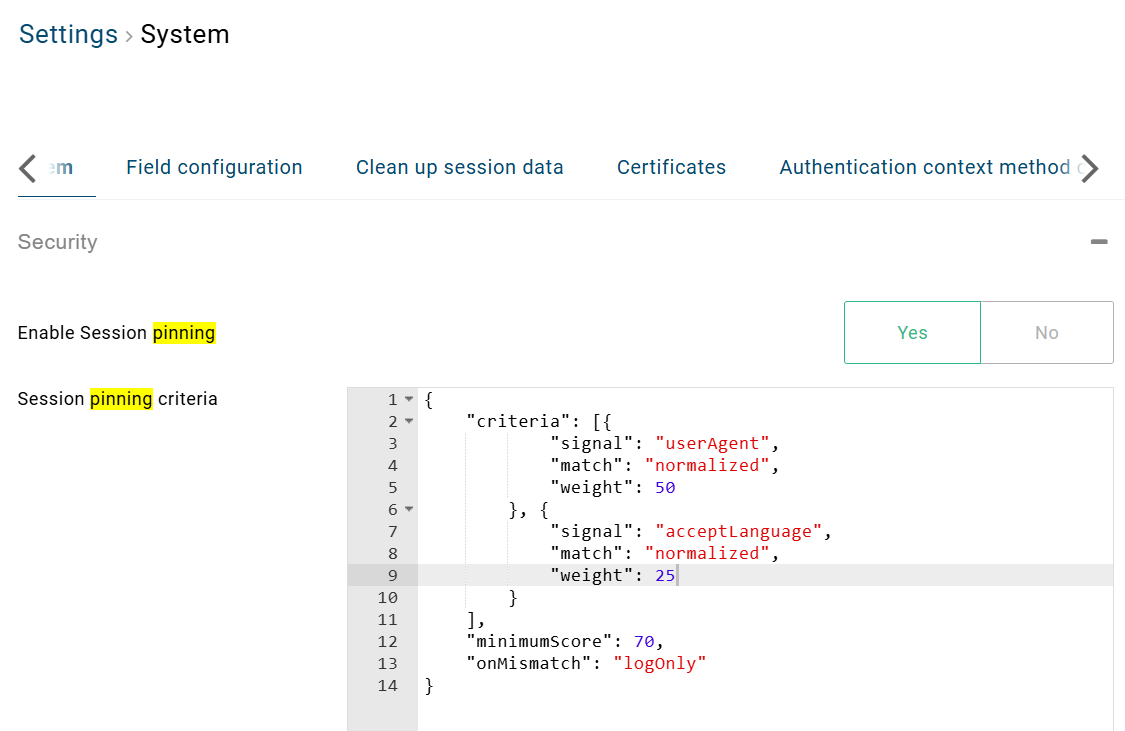
To configure pinning through the API, read the settings with GET /admin/api/rest/v2/systemsetup and update them with PUT at the same endpoint. sessionPinningCriteria is a string containing the JSON document.
The following excerpt shows the session-pinning fields in the SystemSetup configuration model:
{
    "enableSessionIdUserIPPinning": true,
    "sessionPinningCriteria": "{\"criteria\":[{\"signal\":\"userAgent\",\"match\":\"normalized\",\"weight\":70},{\"signal\":\"acceptLanguage\",\"match\":\"normalized\",\"weight\":30}],\"minimumScore\":70,\"onMismatch\":\"logOnly\"}"
}
Example: Mobile users switching between Wi-Fi, 4G, and 5G
This policy omits IP matching. A matching userAgent contributes 70 points and meets the minimum score of 70, even if acceptLanguage changes. Network changes alone do not affect the score. The policy starts in logOnly mode, so session pinning also allows requests below the threshold.
{
  "criteria": [
    { "signal": "userAgent", "match": "normalized", "weight": 70 },
    { "signal": "acceptLanguage", "match": "normalized", "weight": 30 }
  ],
  "minimumScore": 70,
  "onMismatch": "logOnly"
}
Example: Multiple outbound IP addresses
This policy compares the IPv4 /16 prefix. A matching userAgent plus either acceptLanguage or the IP prefix gives a score of 75, exceeding the minimum of 70. Either lower-weight signal can change without causing a mismatch. The policy starts in logOnly mode.
{
  "criteria": [
    { "signal": "userAgent", "match": "normalized", "weight": 50 },
    { "signal": "acceptLanguage", "match": "normalized", "weight": 25 },
    { "signal": "ipAddress", "match": "ipv4Prefix16", "weight": 25 }
  ],
  "minimumScore": 70,
  "onMismatch": "logOnly"
}
Choose the mismatch action
logOnly: Allow requests below the threshold and log a warning under event ID 109 (SessionPinMismatchDetected).block(default): Block requests below the threshold, show a generic error page, and log event ID 108.
Mismatch logs show changed signals, their old and new values, and the score against the threshold. These details do not appear on the user-facing error page.
In this example, the score is 75 against a minimum of 80. Identify logs the mismatch and allows the request because the policy uses logOnly:
{
    "LogLevel": "WARN",
    "EventId": "109",
    "RequestId": "bb8a9841-98d7-43b2-8693-cad2834e14ca",
    "Timestamp": "2026-09-14T03:01:14.2356236Z",
    "MachineName": "identifyvm02",
    "UserId": "(unknown)",
    "Type": "SYS",
    "BuildNumber": "5.20.0.28",
    "System": "RUNTIME",
    "LogId": "c5c959ef-17cc-4060-b097-73e43cfd9d1c",
    "IPAddress": "178.21.252.5",
    "LogMessage": "Session pin mismatch (75/100 score, minimum 80): userAgent matched; acceptLanguage matched; ipAddress 118.69.71.116 -> 178.21.252.5"
}
Validation rules
The API returns 400 Bad Request for invalid JSON, missing or empty criteria, unknown or duplicate signals, unsupported match modes, missing or non-positive weights, invalid mismatch actions, or a threshold below 1 or above the total weight.
If the runtime cannot parse the configuration, it logs event ID 111 and falls back to exact-IP matching with blocking enabled.
Backward compatibility
An empty sessionPinningCriteria preserves the previous exact-IP matching and blocking behavior. In this example, an IP address change causes a mismatch:
{
    "Type": "SYS",
    "RequestId": "4db37d71-4c61-49c2-8e5a-2454e2b33410",
    "BuildNumber": "5.20.0.28",
    "System": "RUNTIME",
    "EventId": "108",
    "LogId": "a45ae5b6-a287-4b41-8ed3-cca1f437328e",
    "Timestamp": "2026-09-14T09:00:14.2558136Z",
    "IPAddress": "178.21.252.5",
    "MachineName": "identifyvm02",
    "UserId": "(unknown)",
    "LogLevel": "ERROR",
    "LogMessage": "Session pin mismatch (0/100 score, minimum 100): ipAddress 171.250.163.19 -> 178.21.252.5"
}