Manual configuration
1. Authentication:
Modify the Web.config file: a. In the identityConfiguration element, can set AUDIENCE_URI point to PasswordReset's WS Federation authentication, set TRUSTED_ISSUERS with Encrypt certificate and Signing Certificate. b. In federationConfiguration element, can set issuer value to WS Federation issuer URL, realm point to PasswordReset's WS Federation authentication, and serviceCertificate is Encrypt certificate.
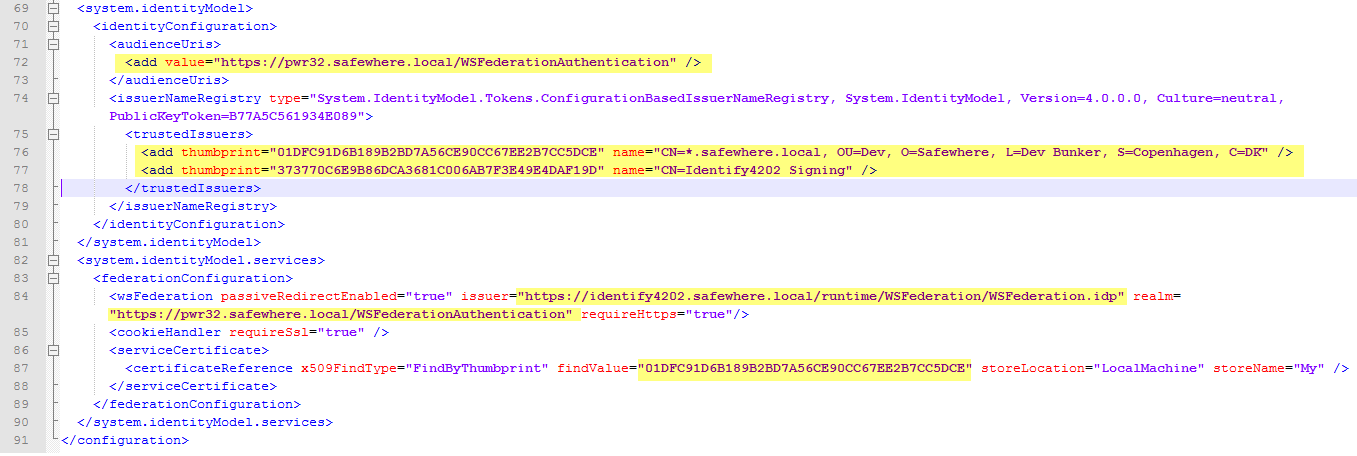
2. Target system:
a. Modify the LdapTargetSystemPlugin.config file: Edit the Target info, such as Targetid, Target Name, and Location of Target config file.

b. Modify Target config file which mentions above: In LdapService element, can set ServiceUrl which points to TargetSystem service's url, e.g LdapCredentialsService.svc, and set EndpointIdentity, as well as ServiceCertificate and ClientCertificate.

3. Common settings:
Modify Target config file which mentions in TargetSystemPlugin.
| Element name | map |
|---|---|
| Description | Setting map criteria |
| Child element | |
| Element name | search-root |
| Description | Define the root level of search. |
| Element name | filter |
| Description | Define how to search user base on "user id". |
| Example | |
| <map> <search-root>OU=Safewhere,DC=safewhere,DC=local</search-root> <filter><![CDATA[(&((&(objectCategory=Person)(objectClass=User)))(employeeNumber={0}))]]> </filter> <scope>0</scope> </map> |
| Element name | filter |
|---|---|
| Description | Setting filter criteria which will filter the result returned from above "map" phase. |
| Attributes | |
| operator | Define Combination Operator. Available values are: And, Or |
| Child element | |
| Element name | property-filter |
| Description | Define the Property and Operator which use in the filter |
| Child element | |
| Element name | name |
| Description | Attribute-name from AD user properties (case sensitive) |
| Element name | operator |
| Description | Supported operators (*) |
| Element name | expression |
| Description | The expression uses in this operator |
| Example | |
| <filter operator="Or"> <property-filter> <name>postalCode</name> <operator><![CDATA[between]]></operator> <expression><![CDATA[700|800]]></expression> </property-filter> <property-filter> <name>displayName</name> <operator><![CDATA[regex]]></operator> <expression><![CDATA[(?=.*[a-z])]]></expression> </property-filter> </filter> |
| Element name | password-policy |
|---|---|
| Description | Define validation rules for new password. |
| Attributes | |
| operator | Define Combination Operator. Available values are: And, Or |
| Child element | |
| Element name | expression |
| Description | The expression which define the validation rules |
| Element name | complexity-requirements |
| Description | Validation rules will include Active Directory complexity requirement property or Not. Available values are: True, False. |
| Element name | message |
| Description | Error message which will display when fail to validate the new password against above rules. |
| Example | |
| <password-policy> <expression><![CDATA[^(?=[^\d_].*?\d)(?=.*[a-z])(?=.*[A-Z])(\w|[!@#\(%<>/]){6,20}\)]]></expression> <complexity-requirements>False</complexity-requirements> <message><![CDATA[The format of the password is incorrect. It should has 6 to 20 characters; at least 1 upper and 1 lower alphanumeric character; at least 1 digit; selected symbols !@#$%<>/ are optional. The password also cannot start with a digit or underscore. The password must meet AD complexity.]]></message> <resource-key></resource-key> </password-policy> |